
Download Viber – Free Secure Messaging & Video Calls for Mac & Windows
Overview
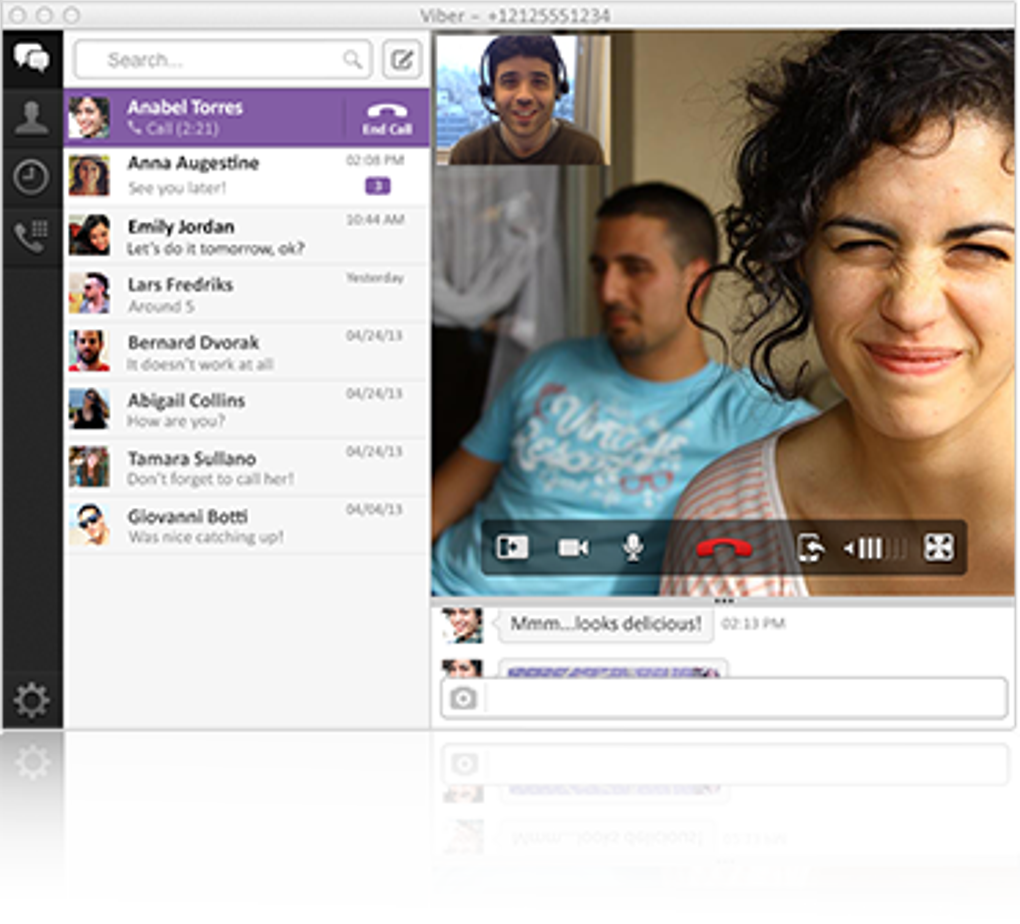
Viber has long been a favorite on iOS and Android for its fast, encrypted messaging and crystal‑clear voice/video calls. In 2023 the developer finally extended that experience to the desktop arena with native clients for Windows 10/11 and macOS 12+. The desktop version mirrors the mobile app’s clean, conversation‑first layout while adding a few desktop‑specific shortcuts that make chatting from a full‑size keyboard feel natural. What really sets Viber apart is its rock‑solid syncing engine – every message, contact, and call log you create on your phone appears instantly on the computer, and vice‑versa. This eliminates the “pick‑up‑where‑you‑left‑off” gap that many competitors still struggle with.
Beyond basic text, Vibe supports stickers, GIFs, and a growing library of animated emoticons, giving users a playful way to express themselves without switching apps. Group chats can host up to 40 participants, and the platform still respects its original promise of end‑to‑end encryption for both one‑to‑one and group conversations. While the desktop client currently lacks the ability to initiate calls to mobile devices (a feature slated for a future update), the quality of Mac‑to‑Mac video calls rivals that of Skype or Zoom, with minimal latency and high‑definition streams.
For businesses and families that already rely on Viber on smartphones, the desktop client acts as a seamless extension, reducing the need to constantly switch devices. Installation is straightforward, updates are delivered automatically through the app’s built‑in updater, and the software remains free with optional in‑app purchases for premium stickers. In short, Viber for desktop is a solid, secure, and user‑friendly alternative for anyone looking to consolidate their communication tools on a single platform.
Key Features
- End‑to‑end encrypted text, voice, and video chats.
- Instant sync of messages, contacts, and call history across mobile and desktop.
- High‑definition 1080p video calls between Mac and Windows users.
- Group chats for up to 40 participants with admin controls.
- Rich media support: stickers, GIFs, emojis, and file sharing up to 200 MB.
- Desktop‑only shortcuts: keyboard navigation, drag‑and‑drop file sharing, and quick‑reply pop‑ups.
- Free to download with optional premium sticker packs.
- Automatic background updates for security patches and feature releases.
- Cross‑platform presence: integrates with Viber on iOS, Android, Windows, and macOS.
- Privacy‑focused: no ads, no data mining, and transparent privacy policy.
Each of these features has been engineered to keep the user experience fluid, whether you’re jumping from a phone call to a video conference on your laptop or simply sharing a document while chatting in a group. The encryption model ensures that only the intended recipients can read the content, and the sync engine leverages cloud‑based message queues that guarantee delivery even on spotty networks. Viber’s desktop client also respects system resources; it runs efficiently in the background without hogging CPU or memory, making it suitable for older MacBooks and low‑spec Windows PCs.
Installation, Compatibility, Pros & Cons, and Frequently Asked Questions
How to Install Viber on macOS and Windows
Getting Viber up and running on your desktop is a breeze. Follow these steps:
- Visit the official Viber download page (viber.com/download) and select the appropriate installer for your operating system.
- For macOS, download the
.dmgfile; for Windows, download the.exeinstaller. - Open the installer and follow the on‑screen prompts. macOS will ask you to drag the Viber icon to the Applications folder; Windows will guide you through a typical “Next‑Finish” wizard.
- Launch Viber. The first launch triggers a QR‑code that you scan with the Viber mobile app (Settings → QR code). This links your desktop client to your existing account.
- Once linked, the app automatically syncs your contacts, chat history, and preferences. No manual import is needed.
Supported Operating Systems
Viber’s desktop client works on the following platforms:
- macOS 12 Monterey and later (Intel & Apple Silicon).
- Windows 10 (64‑bit) and Windows 11.
Older versions of macOS (Catalina and earlier) are not officially supported, though they may run with limited functionality. The application is optimized for both high‑resolution Retina displays and standard HD monitors.
Pros & Cons
- Pros:
- Seamless sync with mobile devices.
- High‑quality video calls between desktops.
- Free core features with optional premium stickers.
- Lightweight footprint on system resources.
- Strong privacy and encryption standards.
- Cons:
- Cannot call mobile phones from the desktop client (as of current release).
- Occasional sync hiccups reported on older macOS versions.
- Group chat limit of 40 participants may be restrictive for large teams.
Frequently Asked Questions
Is Viber for desktop free?
Yes, the desktop application can be downloaded and used at no cost. Premium sticker packs are optional purchases.
How secure are my conversations on Viber?
All one‑to‑one and group chats are end‑to‑end encrypted, meaning only the participants can read the content. Viber does not store plaintext messages on its servers.
Can I transfer my chat history from mobile to desktop?
Yes. Once you link the desktop app with your mobile device via QR code, the entire chat history synchronizes automatically.
What are the system requirements for Viber on Mac?
macOS 12 or later, 2 GB RAM minimum, and at least 150 MB of free disk space for the application and cache.
Why can’t I call a mobile phone from Viber Desktop?
The current version focuses on desktop‑to‑desktop communication. Viber has announced that mobile‑to‑desktop calling will be added in a future update.
Conclusion – Why You Should Download Viber Today
Viber’s desktop client brings the familiar, encrypted messaging experience from smartphones to the larger screen of a Mac or Windows PC without sacrificing performance or privacy. The seamless sync, high‑definition video calls, and intuitive interface make it a compelling alternative to Skype, Zoom, or native messaging apps. While the inability to call mobile phones from the desktop client is a minor drawback, the overall feature set—especially the end‑to‑end encryption and free core functionality—more than compensates.
If you’re looking for a secure, cross‑platform messenger that respects your data and works flawlessly across devices, Viber is worth a download. The installation process is quick, the app stays lightweight, and regular updates keep it secure and feature‑rich. Whether you’re a remote worker needing reliable video conferencing, a family staying in touch, or a tech‑savvy user who wants to consolidate communications, Viber delivers a polished, reliable experience.
Ready to upgrade your chat experience? Download Viber now and enjoy free, secure messaging and crystal‑clear video calls from your desktop.







